🟢 Live Monitoring Active
🏭 Built by COO with 20 Years in Manufacturing

For Lazy Managers
(Who Are Actually Smart)

Self-Driving Shop Floor

Stop managing. Start producing. A manufacturing ecosystem with built-in business processes that guide your team automatically. Less control. More results. The factory that runs itself.

🔌
Simple Setup No complex integrations
🤖
Auto Data Collection Direct from machines
🔗
Process Continuity No steps can be skipped
📱
Telegram Bot Where operators already are

Problems I Actually Solved

The daily frustrations that drove me to build this

📊 Production Tracking Evolution

The journey from clipboard to traceability
📋
Stage 1

Clipboard

Supervisor walks floor every morning. Writes down readings. Enters into Excel later.

❌ One person bottleneck
📊
Stage 2

Google Sheets

Operators enter their own counts. Goes to spreadsheet. But data gets overwritten daily.

⚠️ No history, no traceability
🤖
Stage 3

Telegram Bot

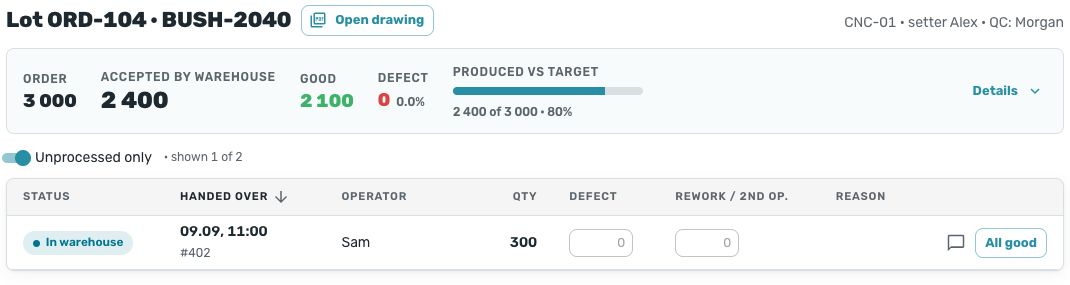
Same simple input. Every reading saved. Batch created. Track through QC → Warehouse → Ship.

✅ Full history & traceability

📋 Production Planning Evolution

From notebook to real-time Kanban
📓
Stage 1

Excel as Notebook

Machine list in Excel. Manual copy-paste. "Who updated this?" Version conflicts.

❌ Error-prone chaos
📊
Stage 2

Excel + Macros

Formulas and macros. Data from Google Sheets pasted in. Works, but no real-time view.

⚠️ Better, but offline & manual
📱
Stage 3

Visual Kanban

Data pulls automatically. Drag jobs to machines. See all queues. Plan in seconds.

✅ Real-time & effortless

🔔 QC Communication Evolution

From "where's the machinist?" to instant alerts
🪑
Stage 1

The "Check Table"

Part on table → QC doesn't notice. QC checks → hunts for machinist. Machinist on break. Everyone running around.

❌ Chaos & lost time
📟
Stage 2

Restaurant Pagers

Machinist takes pager. QC finishes → pager buzzes. No more running. But local only, no history.

⚠️ Better, but limited
📱
Stage 3

Bot Notifications

Machinist logs in bot → all QC get alert. QC approves → machinist & operators notified. Full transparency.

✅ Instant & tracked

🧭 Process Gates (the “Lazy Manager” part)

Automation that replaces follow-ups, reminders, and “did you do it?” questions
Gate 1

Material is mandatory

If material isn’t issued and registered to the machine, a machinist can’t register setup start. No “we’ll write it later”.

Gate 2

QC sees inputs upfront

QC immediately sees what material batch was issued to that machine, and can verify documentation before approving.

Gate 3

Program Vault handover

After setup is completed and sent to QC, the machinist must upload the outgoing CNC program to the database (or write a reason). Otherwise the workflow won’t move forward.

Gate 4

Warehouse warnings

During material issue, the warehouse person gets warnings like “check whether material from the previous job is still on the machine”. The system prevents silent accumulation of mistakes.

"

This is the first software I've seen that was actually designed for how manufacturing people think.

"
Built by Manufacturer, for Manufacturers

Created from 20 Years of Real Experience

I'm not a software vendor who studied manufacturing. I'm a COO with nearly 20 years in production management who built this system to solve my own problems.

This project started with zero commercial intent - just a frustration with existing tools that didn't understand how we actually work. Every feature exists because I needed it on my shop floor.

My Philosophy: The Lazy Manager Approach

I believe in systems that force continuity. Not by “telling people what to do”, but by embedding the business process so the next step is simply impossible to skip.

  • No issued material → no setup start. If material isn’t registered to the machine, setup can’t begin.
  • QC sees the material + docs immediately. No “where is the certificate?” hunting.
  • No outgoing CNC program handover → no QC send. Upload the program to Program Vault or write a reason.
  • Warehouse warnings on issue. The system reminds what must be checked before repeating mistakes from the previous job.
🇮🇱 Israel 🏭 Precision Manufacturing 📅 3+ years as COO

Implementation (How It’s Rolled Out)

A practical path: from today’s reality to a self-driving workflow

1

Explore

Map roles + “where the process breaks”. Decide which steps must be gated.

Day 1
2

Realize

Connect machines + set the core flows (materials → setup → QC → warehouse).

Days 1–3
3

Prep

Configure warehouse segments, Program Vault profiles (ch1/ch2/…), and notifications.

Week 1
4

Deploy

Go live on the floor. The system enforces continuity so managers don’t have to.

Ongoing

What It Does

The features I needed on my shop floor - and built myself

📊

Real-time OEE

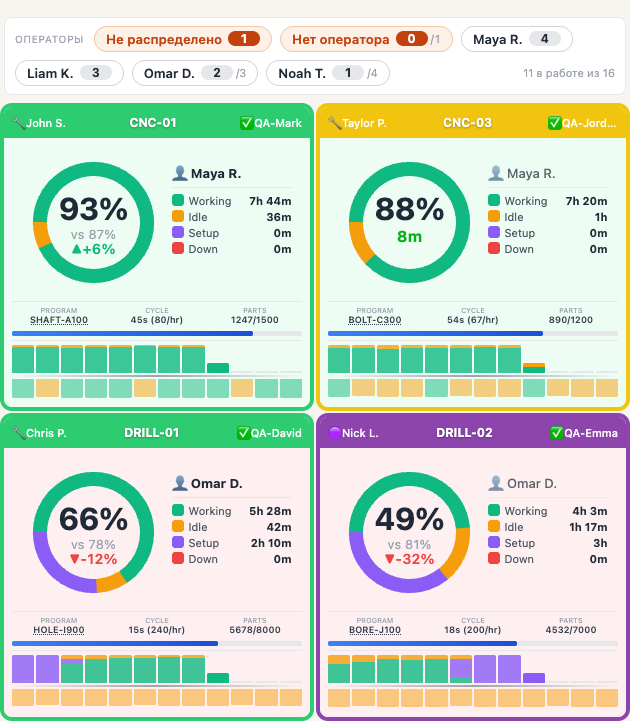
Track utilization with hourly breakdown. Compare shifts. Identify patterns and bottlenecks.

⏱️

Downtime Tracking

Automatic downtime detection and categorization. See exactly where time is lost.

📺

TV Mode

Large-screen dashboard for shop floor displays. Auto-refresh keeps data current.

🔧

Setup Time Analysis

Track changeover times. Optimize scheduling. Reduce non-productive time.

👷

Operator Tracking

See who's working on each machine. Track assignments and shifts in real-time.

🔌

Universal Connectivity

MTConnect, FOCAS, Modbus, OPC-UA. Support for FANUC, DMG, Okuma, Mazak and more.

The Ecosystem

One platform, split into modules — each removes a specific “management load”

Platform Components

The bot is just one interface. The “self-driving” part comes from MES modules below — they connect data, enforce gates, and keep full history.

📋

MES Dashboard

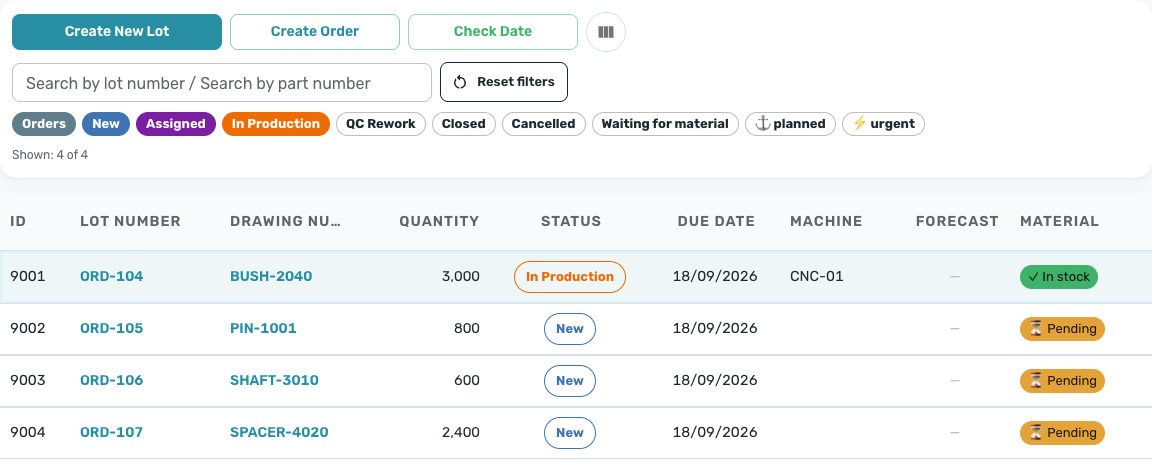
Role-based web UI for planning and operations. This is where managers, QC, and warehouse work.

  • Kanban board with drag & drop
  • QC batch processing
  • Order management + reports
  • Role-based views (operator / machinist / QC / warehouse)
Web Interface
📦

Warehouse Materials

Batch-level material warehouse tied into the whole workflow: traceability, locations, movements, certificates.

  • Batches + locations + inventory positions
  • QR to open a batch card (mobile mode)
  • OCR acceptance + label printing
  • AI: density lookup + weight calculation
Traceability
🧠

AI Advisor (DB-aware)

A project-aware chat: ask questions in natural language, get answers from your data via generated SQL.

  • Text2SQL for “what’s happening?” questions
  • Understands DB + project context
  • On-the-fly translations (RU → HE)
  • No separate translation codebase
Decision Support
📎

Program Vault (CNC)

Central source of truth for CNC programs with immutable revisions. Stops programs from “disappearing”.

  • Immutable revisions (append-only history)
  • Multi-channel (ch1/ch2/ch3…)
  • Browser editor: drafts + publish as revision
  • Gates: outgoing program handover before QC send
Process Discipline
📡

Machine Monitor

Real-time data from CNC machines. OEE, utilization, downtime. Works offline.

  • FOCAS / MTConnect / Modbus
  • Edge Gateway (offline-first)
  • TV Mode for shop floor
  • Hourly charts
LiveShopFloor
📐

Metrology Tracker

Measurement tool management. AI extracts data from calibration certificates.

  • Tool catalog
  • Calibration schedule
  • AI certificate parsing
  • Expiry reminders
Quality

18+

Machines Monitored

6M+

Parts Tracked

24/7

Real-time Data

3+

Years in Production Use

Works with your machines

Let's Connect

I'm always happy to discuss manufacturing challenges, share experiences, or just talk shop. This isn't a sales pitch - I genuinely enjoy connecting with people in the industry.